
Using Cygwin’s bash Babun terminal in a JetBrains IDE
Babun
pwd?
Hold on… you might notice you’re in the wrong directory now. The terminal opened in C:\Users\YOUR-USERNAME\ instead of opening at the root of the current project like it typically would with the default shell. This would drive me mad, especially when switching projects or opening more terminal tabs. To fix this, open up C:\Users\YOUR-USERNAME\.babun\cygwin\etc\bash.bashrcfor Babun, C:\cygwin\etc\bash.bashrc (or similar) for Cygwin, and add a new line to the end; cd $OLDPWD. Now, you're brought to the current project's room every time you open the terminal or another terminal tab.
Related Articles

Enterprise Start Here: Your Gateway to Operational Excellence
New to our enterprise platform? This guide provides a structured onboarding path, from foundational reference models to actionable playbooks, runbooks, and assessments designed for seamless implementation.

How to Scan and Clean Your Cloud Linux Server from Malware
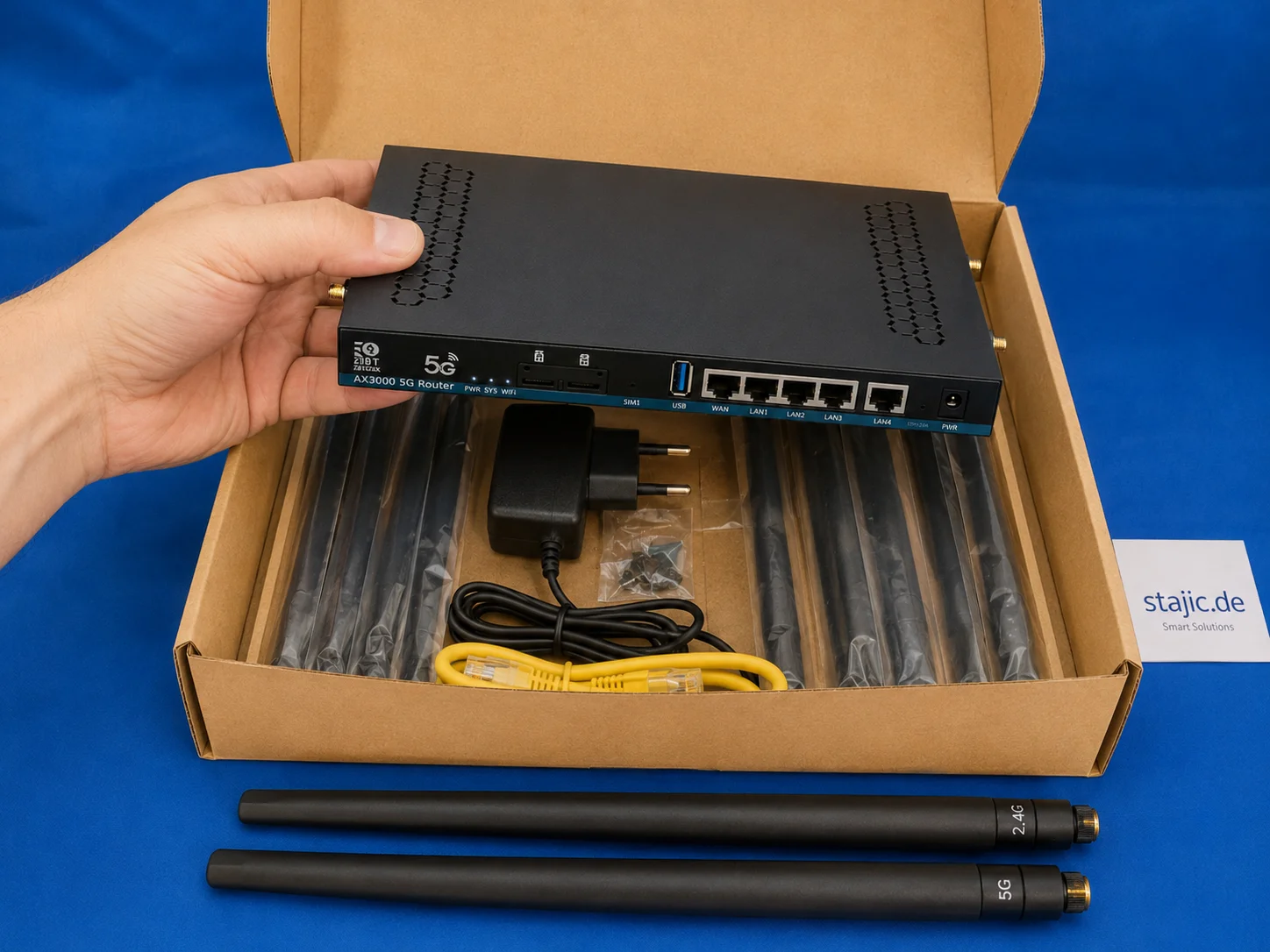
ZBT Z8102AX Hardware and Packaging Review: Strong Router, Weak Box
The ZBT Z8102AX makes a solid first impression as a slim black metal 5G OpenWrt router with multiple antenna connectors, dual-SIM slots, USB, LAN/WAN ports and a practical accessory set. The hardware feels useful and serious, but the packaging is clearly the weak point.

Emerging Linux Trends in 2026: Shaping the Future of Server Infrastructure
Explore the key Linux trends of 2026, from Kubernetes dominance and immutable distributions to AI integration and eBPF security.

HEIC to JPG Conversion: Why You Should Consider It and How It Works
HEIC offers modern image compression and high quality, but JPG remains the most compatible format. This guide explains when and how to convert HEIC to JPG using Linux tools and automation.

Comprehensive Guide to Rollback Triggers in Enterprise AI Runbooks
This guide explores Rollback Triggers, essential mechanisms in enterprise AI runbooks that automatically detect anomalies and initiate rollbacks to maintain system stability. Learn how to configure, monitor, and optimize these triggers for robust AI deployments.

ZBT Z8102AX 5G OpenWrt Router Review: Dual SIM, RM500U-EA and an Honest Assessment
The ZBT Z8102AX is an unusual 5G router with an OpenWrt base, a dual-SIM concept, and a Quectel RM500U-EA modem. In testing, it shows clear strengths in flexibility, interfaces, and mobile connectivity, but also the typical weaknesses of a vendor-modified OpenWrt build.

Streamlining Code Quality: Testing with ESLint and Prettier
This article details the integration of ESLint and Prettier into modern development and testing workflows, focusing on practical implementation for consistent code quality and style.

Remove Duplicate APT Package Sources: Expert Guide for Ubuntu and Debian
A detailed guide for identifying and removing redundant or duplicate APT package sources in Debian and Ubuntu systems to ensure stability and performance.

ZBT Z8102AX OpenWrt 21.02 Firmware Review: Stable Enough, but Is It Future-Proof?
The ZBT Z8102AX runs a vendor-modified OpenWrt 21.02 build with kernel 5.4.246. In practical testing, the firmware worked successfully and kept the router stable for several days, but the old base raises important questions about security, modem control, upgrade paths and long-term maintainability.

Google I/O 2026: Antigravity, AI Studio, and the Shift to Agentic DevTools
Google I/O 2026 made one thing clear for engineers: AI tooling is moving beyond autocomplete into managed agentic execution. This article breaks down Antigravity 2.0, the expanding role of Google AI Studio, Gemini 3.5 Flash, and the real trade-offs around orchestration, lock-in, verification, and developer workflow design.

Enterprise-Grade Multi-Tenant Architecture for an International Platform
Loving Rocks is an enterprise-grade wedding platform designed with a true multi-tenant architecture, isolated databases per tenant, and built-in internationalization for global scalability, security, and long-term operational stability.