
Streamlining Code Quality: Testing with ESLint and Prettier
Streamlining Code Quality: Testing with ESLint and Prettier
Modern software development demands rigorous attention to code quality and consistency. As projects scale and teams grow, maintaining a uniform codebase becomes a significant challenge. Discrepancies in style, subtle bugs, or adherence to best practices can introduce technical debt and slow down development cycles. ESLint and Prettier address this directly, providing automated solutions for code linting and formatting. Integrating these tools into development and testing workflows is not merely a best practice; it is a fundamental requirement for sustainable project health.
This article details their synergistic application, focusing on practical implementation within a robust testing strategy. We will explore how these tools enhance developer productivity, reduce review overhead, and ensure codebases remain clean, readable, and aligned with defined standards, particularly crucial for complex projects like those found at stajic.de.
Overview of ESLint and Prettier
ESLint is a static analysis tool designed to identify problematic patterns found in JavaScript code. It enforces specific coding styles and detects potential errors before execution. Its configurability allows teams to define custom rules, ensuring adherence to project-specific guidelines or industry best practices. ESLint operates by parsing code into an Abstract Syntax Tree (AST) and then running various rules against it to flag issues.
Prettier, conversely, is an opinionated code formatter. It parses code and re-prints it with its own rules, ensuring consistent style across the entire codebase without developer intervention. Prettier focuses solely on aesthetic consistency, handling aspects like indentation, line breaks, semicolons, and quote styles. It aims to eliminate all style-related debates during code reviews. While ESLint focuses on code quality and potential issues, Prettier focuses purely on stylistic uniformity. Their combined use ensures both functional correctness and stylistic consistency.
Benefits of Integration
- **Automated Code Consistency:** Eliminates manual style debates and ensures all code adheres to predefined standards, regardless of the individual developer's preferences.
- **Early Error Detection:** ESLint identifies syntax errors, potential bugs, and anti-patterns during development, often before the code is even run, significantly reducing debugging time.
- **Reduced Code Review Overhead:** Reviewers can focus on logic, architecture, and business requirements rather than spending time correcting formatting or minor style discrepancies.
- **Improved Readability and Maintainability:** A consistently formatted and linted codebase is easier to read, understand, and maintain for all team members, including those new to the project.
- **Enhanced Developer Productivity:** Developers spend less time manually formatting or fixing style issues, freeing them to concentrate on feature development and problem-solving.
- **Seamless Onboarding:** New team members can quickly contribute code that matches existing standards without extensive manual style guides or lengthy feedback loops.
Technical Details and Implementation
Implementing ESLint and Prettier involves a few key steps: installation, configuration, and integration into your project's scripts. For projects like those hosted on stajic.de, a robust setup is paramount.
First, install the necessary packages as development dependencies:
npm install --save-dev eslint prettier eslint-config-prettier eslint-plugin-prettier
Next, configure ESLint and Prettier. Create `.eslintrc.js` and `.prettierrc.js` files in your project root.
**`.eslintrc.js`:**
module.exports = { env: { browser: true, es2021: true, node: true, }, extends: [ 'eslint:recommended', 'plugin:prettier/recommended', // Integrates Prettier with ESLint ], parserOptions: { ecmaVersion: 12, sourceType: 'module', }, rules: { // Custom ESLint rules can go here // Example: 'no-unused-vars': 'warn', }, };
The `plugin:prettier/recommended` extension is critical here. It enables `eslint-plugin-prettier` which runs Prettier as an ESLint rule, and `eslint-config-prettier` which disables all ESLint rules that might conflict with Prettier's formatting. This ensures Prettier handles all formatting, while ESLint focuses on code quality.
**`.prettierrc.js`:**
module.exports = { semi: true, trailingComma: 'all', singleQuote: true, printWidth: 100, tabWidth: 2, };
These are common Prettier options. Adjust them to match your team's preferred style. Consistency is the goal, not a specific set of rules.
Finally, add scripts to your `package.json` for easy execution:
{ "name": "stajic-project", "version": "1.0.0", "description": "Code quality demonstration for stajic.de", "main": "index.js", "scripts": { "lint": "eslint .", "lint:fix": "eslint . --fix", "format": "prettier --write .", "check:format": "prettier --check ." }, "devDependencies": { "eslint": "^8.x.x", "eslint-config-prettier": "^8.x.x", "eslint-plugin-prettier": "^4.x.x", "prettier": "^2.x.x" } }
The `lint` script runs ESLint to report issues. `lint:fix` attempts to automatically fix them. `format` uses Prettier to reformat files, and `check:format` verifies if files are formatted correctly without making changes. This is useful for CI checks.
A typical project structure might look like this:
my-project/ ├── .eslintrc.js ├── .prettierrc.js ├── package.json ├── src/ │ └── index.js └── tests/ └── index.test.js
To demonstrate, consider a simple `src/index.js` file:
const myFunction = ( a,b ) => { if(a > b) { console.log( 'A is greater' ) } else { console.log( 'B is greater or equal' ) } } myFunction(5, 3);
Running `npm run format` would transform this into:
const myFunction = (a, b) => { if (a > b) { console.log('A is greater'); } else { console.log('B is greater or equal'); } }; myFunction(5, 3);
Running `npm run lint` would then ensure no quality issues remain. This separation of concerns is powerful.
### Acknowledging Trade-offs: The "This Went Wrong" Moment
While highly beneficial, the initial setup of ESLint and Prettier can present challenges. Early in a project for stajic.de, we encountered a common pitfall: ESLint's `indent` rule was configured to enforce 4 spaces, while Prettier's default was 2 spaces. This led to an infinite loop of formatting changes. Running `eslint --fix` would change indentation to 4 spaces, then `prettier --write` would revert it to 2 spaces. This resulted in failed CI checks and unnecessary merge conflicts. The resolution involved carefully configuring `eslint-config-prettier` to disable all ESLint rules that conflict with Prettier. Specifically, ensuring `plugin:prettier/recommended` was the last entry in `extends` in `.eslintrc.js` correctly delegated formatting concerns entirely to Prettier, allowing ESLint to focus on code quality without style conflicts. This highlights the importance of understanding the interaction between these tools and prioritizing Prettier for formatting.
Use Cases and Applications in Testing Workflows
Integrating ESLint and Prettier into various stages of the development and testing workflow maximizes their impact.
**1. Pre-commit Hooks (e.g., with Husky and lint-staged):**
This is a critical integration point. By using tools like Husky (for Git hooks) and `lint-staged` (to run commands on staged Git files), you can automatically run ESLint and Prettier on files before a commit is finalized. This prevents malformed or non-compliant code from ever entering the repository. It's a powerful shift-left strategy for quality control. A typical `package.json` configuration excerpt might look like this:
// package.json (excerpt) "husky": { "hooks": { "pre-commit": "lint-staged" } }, "lint-staged": { "*.js": [ "eslint --fix", "prettier --write", "git add" ] }
This setup ensures that every commit is clean. No exceptions.
**2. CI/CD Pipelines:**
Integrate linting and formatting checks as mandatory steps in your Continuous Integration/Continuous Deployment (CI/CD) pipeline. Any failure in these checks should block the merge or deployment. This provides a final safety net, ensuring that even if a pre-commit hook was bypassed or misconfigured, the code quality standards are still enforced before reaching production. Commands like `npm run check:format` and `npm run lint` are ideal for CI environments.
**3. IDE Integration:**
Most modern Integrated Development Environments (IDEs) like VS Code, WebStorm, or Sublime Text offer extensions for ESLint and Prettier. These extensions provide real-time feedback on code quality and style issues directly within the editor. Many can also be configured to auto-format files on save. This shifts error detection even further left in the development cycle, providing immediate feedback to the developer and preventing issues before they are even staged.
**4. Automated Pull Request Checks:**
Configure repository settings (e.g., GitHub, GitLab) to require successful linting and formatting checks before a pull request can be merged. This ensures that all contributions, regardless of origin, adhere to the project's established code quality and style standards. It acts as a gatekeeper for the main branch, maintaining its integrity.
Fazit
The combination of ESLint and Prettier provides a robust, automated framework for maintaining high code quality and consistent style across any software project. By strategically integrating these tools into development workflows, pre-commit hooks, IDEs, and CI/CD pipelines, teams can significantly reduce technical debt, streamline code reviews, and enhance overall project maintainability. This proactive approach ensures that codebases remain clean, readable, and adhere to established standards, which is critical for long-term project success, especially for complex systems like those found at stajic.de. The initial setup investment is quickly recouped through increased developer efficiency, reduced debugging efforts, and a more enjoyable development experience. Implementing these tools is not optional; it is a foundational element of modern, professional software development.
Related Articles

AI Agent Memory Is Not RAG: How to Separate Memory, Retrieval, State and Context
Agent memory, RAG, state, and context are often used as if they were interchangeable. They are not. This practical architecture model separates the four layers, shows where each belongs, and explains what breaks when systems collapse them into one.

What Is RAG? The Simplest Explanation of How It Works
RAG sounds complicated, but the idea is simple: before an AI answers, it first looks up useful information from a knowledge source and gives that information to the language model. This guide explains RAG, LLMs, state, memory and tools using one simple mental model.
ZBT Z8102AX Hardware and Packaging Review: Strong Router, Weak Box
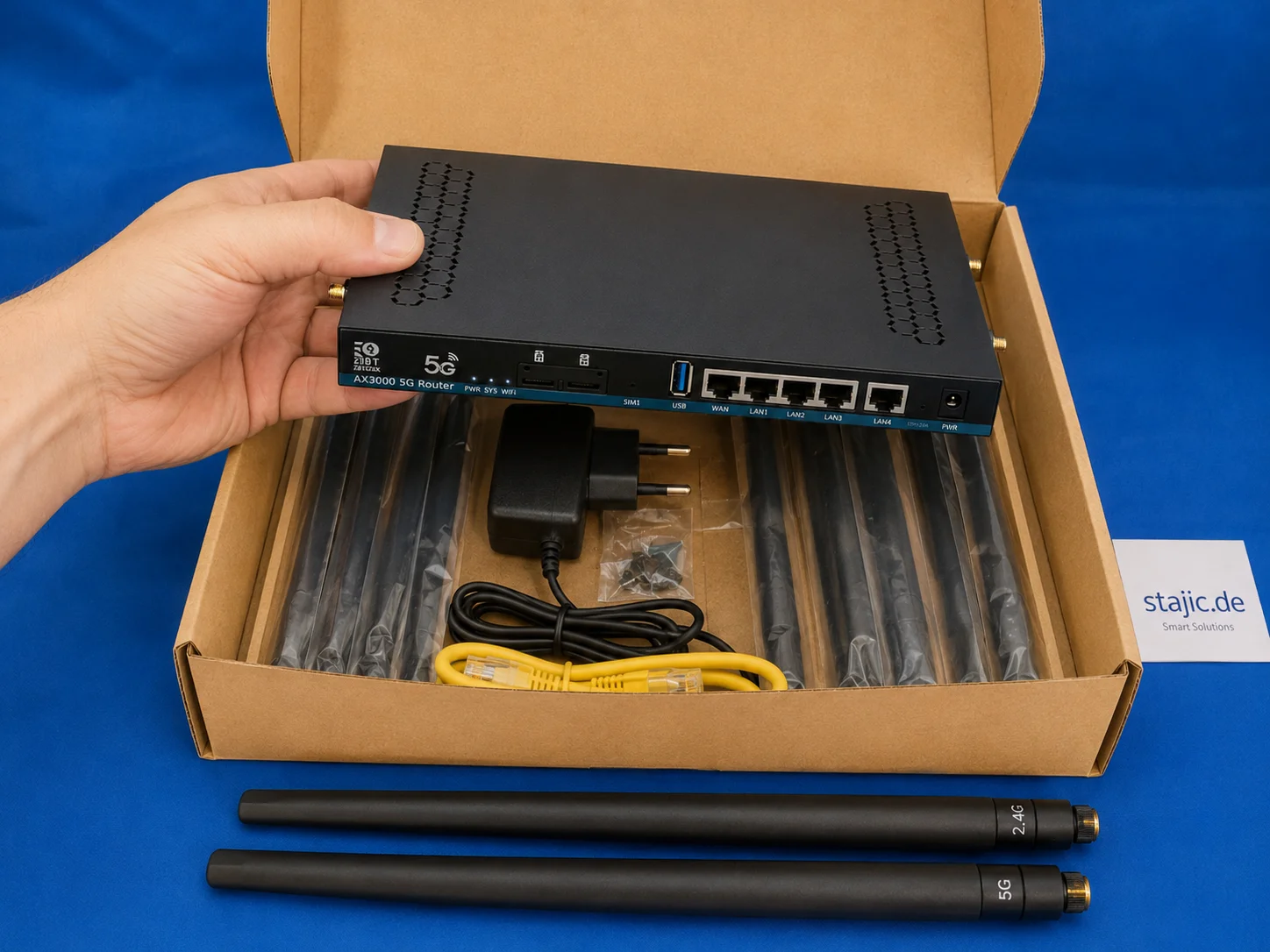
The ZBT Z8102AX makes a solid first impression as a slim black metal 5G OpenWrt router with multiple antenna connectors, dual-SIM slots, USB, LAN/WAN ports and a practical accessory set. The hardware feels useful and serious, but the packaging is clearly the weak point.

ZBT Z8102AX OpenWrt 21.02 Firmware Review: Stable Enough, but Is It Future-Proof?
The ZBT Z8102AX runs a vendor-modified OpenWrt 21.02 build with kernel 5.4.246. In practical testing, the firmware worked successfully and kept the router stable for several days, but the old base raises important questions about security, modem control, upgrade paths and long-term maintainability.

What Is Context Engineering? What the Model Receives Before It Answers
Context engineering designs what information an AI model receives before inference, including prompts, retrieval, memory, application state, tool results and conversation history.

Migrating from OpenAI Agents SDK to the Agents API: What Actually Changes Architecturally?
Migrating from the OpenAI Agents SDK to the new Agents API is not an import rename. The runtime boundary changes: the agent loop, durable session, orchestration, context compaction and recovery move toward a managed harness. This guide shows what should move, what should stay in your application, and how to prove the migration before cutover.

Qwen 3.6 in Production: Release Runbook, AI Rollback, and LLMOps Versioning
Qwen 3.6 is not just another model upgrade. It is a release event, a rollback scenario, and a versioning problem at the same time. This article explains how Qwen 3.6 should be handled in production through LLMOps discipline, prompt and model traceability, controlled rollout, and evidence-based rollback readiness.

Google I/O 2026: Android XR, Intelligent Eyewear, and the Ambient AI Interface
Google I/O 2026 pushed Android XR and intelligent eyewear from concept toward a real platform direction. This article breaks down audio glasses, display glasses, Gemini-powered context awareness, developer implications, privacy risks, and why wearable AI is less about replacing phones and more about creating ambient assistance surfaces.

Source of Truth in AI Systems: Where Reliable Knowledge Actually Comes From
A Source of Truth defines which source is authoritative for a specific fact or state. Learn how it differs from RAG, provenance, memory, context, vector databases and systems of record.
Portal Development: A Scalable Platform for Performance, Multilingual Support, and Extensibility

MCP Explained: What It Connects, What It Does Not Do and Where It Fits
Model Context Protocol connects AI applications to external tools, resources and prompts through a standard client-server boundary. Learn what MCP does, what it does not do, and where it fits in agent architecture.

The Next OpenWrt 5G Router: Why Wi-Fi 7, a Stronger CPU and Better Firmware Matter
The ZBT Z8102AX is a useful first sample, but the next step should be stronger: Wi-Fi 7, a more powerful four-core platform, better firmware clarity, improved packaging and a more stable pricing policy. The goal is not just another 5G router, but a better configured OpenWrt-based prosumer device.