
GitHub: https://github.com/Aaasaasa



Aaasaasa AI Web Client — ROOT README.md (enhanced)
Aaasaasa AI Web Client is a desktop (Electron) + web (Nuxt 4 SPA) client for AI workflows: chat, local functions, RAG search, and PDF/HTML ingestion. Focus: speed, local control, and integration with vector search.
This repository covers the Web Client. For the complete system, it is recommended to also use:
aaasaasad– local/remote daemon (REST/WS) for/chat,/memorize,/search, load-balancing (vLLM sessions…), etc.aaasaasa-cli– CLI tool (document ingest, export/import, collection management).- Qdrant – local vector database (RAG/top‑K) for document & query search, analytics, profiling.
- DuckDB – local integrated database (sessions, messages, metrics).
Renderer is a pure SPA (SSR disabled). DuckDB and Qdrant are not imported from Nuxt — everything goes via Electron IPC.
✨ Features
- 🖥️ Electron + Nuxt 4 (SPA): fast startup, isolated Chromium profile, DevTools.
- 🔐 Preload bridge:
contextIsolation,nodeIntegration=false,sandbox=false(desktop app). - 🗃️ DuckDB (Node‑API): local SQL/analytics; CSV/Parquet ingest handled in the main process.
- 📊 Qdrant: RAG & semantic search (REST client in main process).
- ⚙️ Config via JSON:
aaasaasa.config.json(dev: root; prod: copied intoresources/). - 🎛️ Workspaces & UI: theme (dark/light/system), accent color, font size.
- 🔌 LLM provider layer:
aaasaasa-cli, OpenAI, Ollama, HF (via config). - 🛡️ Security modes: relaxed CSP for desktop; optional cross‑origin isolation for WASM needs.
- 🐧 Packaging: Linux AppImage + .deb; Windows .exe; macOS .dmg (planned).
🧱 Architecture
┌──────────────────────┐
│  Electron (main)     │  ← .env (dev) + aaasaasa.config.json (prod/resources)
│  - IPC handlers       │
│  - DuckDB (node-api)  │
│  - Qdrant REST        │
│  - fetch/cheerio      │
│  - security (CSP)     │
└─────────▲────────────┘
          │ IPC (preload exposes window.aaasaasa)
┌─────────┴────────────┐
│  Nuxt 4 SPA renderer  │
│  - UI (Tailwind/shadcn)│
│  - Chat store / RAG UI │
└─────────▲────────────┘
          │ HTTP/WS (optional)
┌─────────┴─────────────┐
│  aaasaasad (daemon)    │
│  - /chat, /memorize    │
│  - sessions, search    │
└────────────────────────┘
Additionally: Qdrant (vectors) • DuckDB (local records)
✅ Prerequisites
- Node.js 20+ (24+ recommended)
- pnpm
- Qdrant running on
http://localhost:6333(or set in config) - Linux for building (AppImage/deb). Windows/macOS builds supported via electron‑builder.
🚀 Quick Start (dev)
- Clone the repo and place
aaasaasa.config.jsonin root (example below). - (Optional)
.envin root (dev only), e.g.:
NODE_ENV=development
DEV_SERVER_URL=http://localhost:3000
- Start dev:
./bootstrap.sh
The script cleans build artifacts, loads root .env, starts Nuxt dev (app/) and Electron (electron/main.cjs).
Dev mode reads
.envfrom the repo root, not from packaged paths.
📦 Production build
./bootstrap-prod.sh
This will:
- Run Nuxt static build →
app/.output/public - Copy renderer →
electron/renderer/(packed into app.asar) - Copy
aaasaasa.config.json(root →resources/) - Run
electron-builder(AppImage + deb)
In production,
.envis not used; values come fromaaasaasa.config.json.
🗂️ Project structure
aaasaasa-web-client/
├─ aaasaasa.config.json   # single source of truth (root)
├─ app/                   # Nuxt 4 (SPA)
│  ├─ assets/css/tailwind.css
│  ├─ plugins/*.client.ts
│  ├─ pages/index.vue
│  └─ nuxt.config.ts      # ssr:false; app.baseURL ('/' for app://); buildAssetsDir '_nuxt/'
├─ electron/
│  ├─ main.cjs            # window + IPC + DuckDB/Qdrant init
│  ├─ preload.cjs         # exposes window.aaasaasa (readonly)
│  ├─ web.cjs             # fetch/http + cheerio helpers
│  ├─ vector.cjs          # Qdrant REST adapter
│  ├─ security.cjs        # CSP/permissions (relaxed desktop mode)
│  └─ renderer/           # (prod) Nuxt output (packed in asar)
├─ bootstrap.sh
├─ bootstrap-prod.sh
└─ README.md
⚙️ Configuration (aaasaasa.config.json)
Example:
{
  "ui": { "appTitle": "Aaasaasa AI Tool by Aleks" },
  "apiBase": "http://localhost:3000",
  "wsBase": "ws://localhost:3000",
  "duckdb": {
    "path": "./duckdb/aaasaasa.duckdb",
    "threads": "auto",
    "memoryLimit": "12GB"
  },
  "rag": {
    "vectorStore": {
      "url": "http://localhost:6333",
      "collection": "aaasaasa",
      "size": 384
    }
  },
  "security": {
    "allowedOrigins": [
      "http://localhost:3000",
      "http://localhost:6333",
      "https://api.openai.com",
      "https://cdn.jsdelivr.net",
      "https://unpkg.com"
    ]
  },
  "ai": {
    "provider": "openai",
    "openai": { "baseURL": "https://api.openai.com/v1", "model": "gpt-4o-mini", "apiKey": null },
    "ollama": { "baseURL": "http://localhost:11434" },
    "hf": { "inferenceURL": "", "apiKey": null }
  },
  "features": { "streaming": true, "rollingSummary": true, "telemetry": false }
}
Policy: Dev reads .env + config from root; Prod copies config into resources/ and does not use .env.
🧩 Nuxt config (SPA for Electron)
// app/nuxt.config.ts
export default defineNuxtConfig({
  ssr: false,
  app: {
    // For app:// loader keep '/'; for file:// use './'
    baseURL: '/',
    buildAssetsDir: '_nuxt/'
  },
  nitro: { preset: 'static' }
});
🌐 app:// protocol loader (no file:// pitfalls)
Electron main (snippet):
protocol.registerSchemesAsPrivileged([
  { scheme: 'app', privileges: { standard: true, secure: true, supportFetchAPI: true, corsEnabled: true, stream: true } }
]);

protocol.registerFileProtocol('app', (request, callback) => {
  const u = new URL(request.url);              // app://-/_nuxt/entry.js
  const clean = decodeURI(u.pathname).replace(/^\/+/, '');
  const base = path.join(__dirname, 'renderer');
  let target = path.normalize(path.join(base, clean));
  if (!target.startsWith(base)) return callback({ error: -6 });
  fs.stat(target, (err, st) => {
    if (!err && st.isDirectory()) target = path.join(target, 'index.html');
    else if (err && !path.extname(clean)) target = path.join(base, 'index.html');
    callback({ path: target });
  });
});

// In prod ALWAYS use a real host component, e.g. 'app://-/index.html'
win.loadURL('app://-/index.html');
If you load
app://index.html, the host becomesindex.htmland/_nuxt/*resolves toapp://index.html/_nuxt/*→ 404. Useapp://-/index.htmlorapp:///index.html.
🦆 DuckDB (Node‑API) — init & locking
db.cjs (essentials):
let instance = null, connection = null, currentPath = null;

async function init(cfg = {}) {
  const { DuckDBInstance, DuckDBConnection } = require('@duckdb/node-api');
  const target = cfg.path || ':memory:';
  if (connection && currentPath === target) return connection; // idempotent
  if (connection) await closeDuck();

  instance = await DuckDBInstance.create(target);
  connection = await DuckDBConnection.create(instance);
  currentPath = target;

  const threads = Number(cfg.threads) || require('os').cpus().length || 1;
  await connection.run(`PRAGMA threads = ${threads}`);
  if (cfg.memoryLimit) await connection.run(`PRAGMA memory_limit = '${cfg.memoryLimit}'`);
  return connection;
}
Main process (single init + single instance lock):
const gotLock = app.requestSingleInstanceLock();
if (!gotLock) { app.quit(); return; }

app.whenReady().then(async () => {
  const raw = loadConfigRaw();
  const cfg = normalizeConfig(raw);
  await duckdb.ensurePath(cfg.duckdb?.path);
  await duckdb.init(cfg.duckdb); // single init
  createWindow();
});

app.on('before-quit', () => duckdb.closeDuck().catch(() => {}));
Tips to avoid Conflicting lock is held …:
- Do not start dev & packaged app at the same time on the same DB file.
- Use different DB paths per mode (e.g. dev
:memory:or separateuserData/dev). - Initialize DB once and reuse the connection.
🔌 IPC bridge (preload → window.aaasaasa)
window.aaasaasa: {
  env:    { isDev: boolean, versions: Record<string,string> },
  config: { get(): Promise<any> },
  db:     { sql(query: string, params?: any[]): Promise<any> },
  vector: {
    upsert(points: Array<{ id?: string|number, vector: number[], payload?: any }>, opts?: any): Promise<any>,
    search(vector: number[], opts?: { top?: number, limit?: number, score_threshold?: number }): Promise<any>
  },
  chat?:  { open(): Promise<{ ok: true }> }
}
Examples (Nuxt):
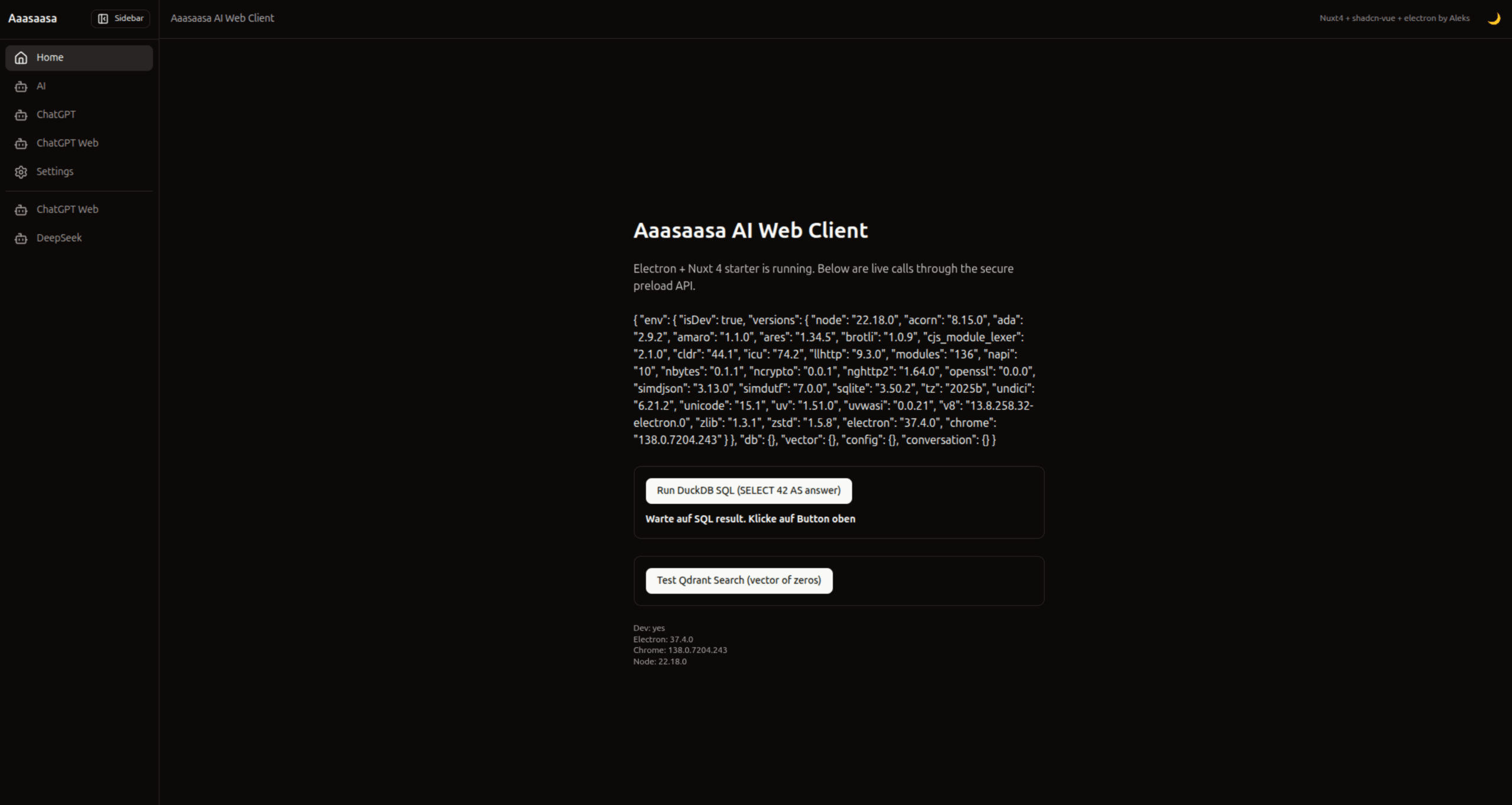
const rows = await (globalThis as any).aaasaasa.db.sql('SELECT 42 AS answer');
const hits = await (globalThis as any).aaasaasa.vector.search(new Array(384).fill(0), { top: 3 });
🧰 Scripts
./bootstrap.sh— dev mode (cleans, loads.env, starts Nuxt + Electron)./bootstrap-prod.sh— prod build (Nuxt build, copy renderer + config, electron‑builder)
🧯 Troubleshooting
- Blank page / 404 for
/_nuxt/*→ ensureapp://-/index.htmland protocol handler above. - DB
not initialized→ callduckdb.init(...)before first IPCdb:sql. Could not set lock on file …→ another process holds the DB; ensure single instance and distinct dev/prod DB paths.- DevTools not opening → call on
ready-to-showand/or useCtrl/Cmd+Shift+Ishortcut.
🗺️ Roadmap
- Separate READMEs for
electron/(IPC/preload/security) andapp/(UI/store/plugins) - Rolling summary util (stable chat > 300 messages)
- Qdrant top‑K cache & chunking ingest
- PDF generator and optional Python bridge
- CI (lint/test/build) and release scripts
📜 License
TBD (temporarily: All rights reserved / or MIT at your decision).
DuckDB and Qdrant are under their respective licenses.